
If the battery in your Hyundai Palisade key fob has died, you can easily replace it at home. By simply opening up your key fob and exchanging the dead battery for a new one, you can avoid having to order a brand-new key. Courtesy of Key Hyundai, here’s how you can replace the battery in your key fob on your own.
Opening the Key Fob
All you need to open your Hyundai Palisade key is a flathead screwdriver. First, push the lever on the back of your key fob to remove the actual key from its holder. Set this aside.
Then, take your screwdriver and place it in the slot next to the keyhole. With the Hyundai logo facing up, move your screwdriver around to snap the plastic up; move the screwdriver around to lift the rest of the cover off.
Removing the Dead Battery
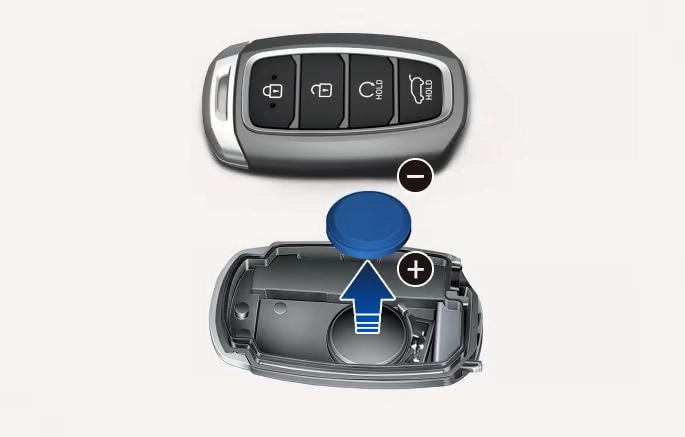
Next, it’s time to remove the battery. Gently push the bottom of the battery to remove it from its housing. When it’s out, check the flat side of the battery for the model number: that will tell you what type of battery you should replace it with. Typically, this will be a CR2032 battery, but yours may differ.
Replacing the Battery
Take your new battery and make sure that the positive (+) side is facing upwards. Slide it into the housing and make sure it’s secure. Then, you can snap the two halves of the plastic shell back together and re-insert the key; your fob should light up to show that it’s operational.
Learn More About Your Hyundai Palisade Key in Jacksonville, FL
Now you know how to replace the battery in your Hyundai Palisade key fob — but what if your key still doesn’t work? Contact Key Hyundai today to order a replacement key and send it to our dealership for pickup.
Categories:
Parts


